For businesses · and for you

Your books, always in order.

Invoices and online payments, receipts and expenses, bank reconciliation, payroll and checks, contracts and tax-ready reports — in one clean workspace, for a company or just your own money.

See how it works · Free plan, no credit card

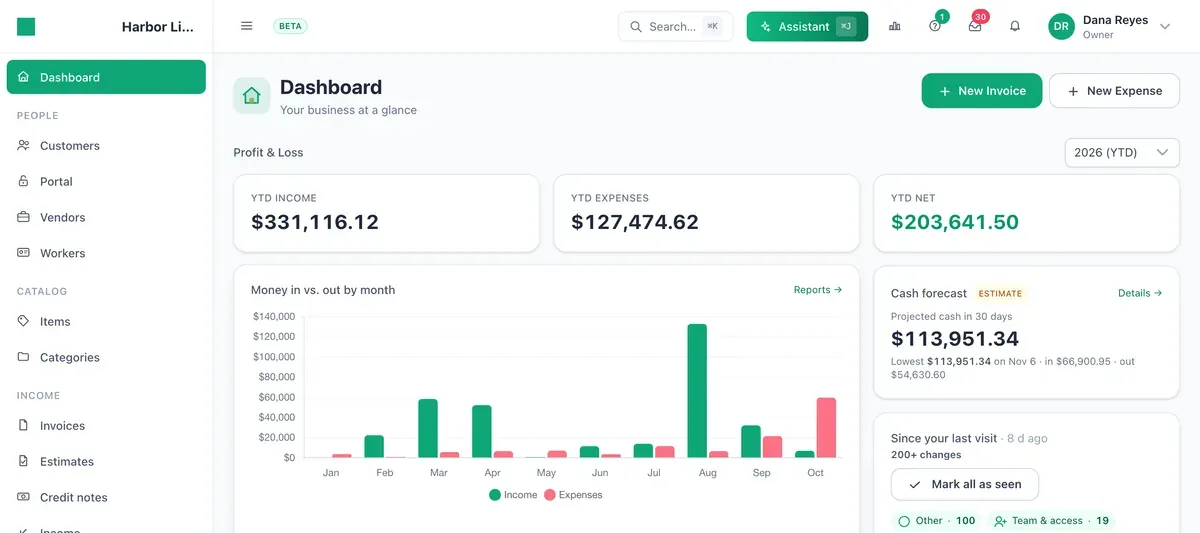
Sumqo dashboard: year-to-date income, expenses and net, money in and out by month, a 30-day cash forecast and items that need attention.

Included on every plan

  • Unlimited invoices
  • Bank reconciliation
  • AI receipt reading
  • Two-factor sign-in

Made for companies and for people

The same clean books, whether you run a business or your household.

For your business

LLCs, S-corps, sole props and freelancers: invoice clients, pay vendors and staff, reconcile the bank and hand your accountant tax-ready numbers.

For personal & household

Track your income and spending, keep receipts and statements together and stay ready for your personal tax filing — no accounting degree required.

One workspace for the whole money side

From the first invoice to the tax report — here is what it looks like inside.

Invoicing

Send invoices and get paid sooner

Create unlimited invoices, estimates and credit notes with your logo. Every invoice has its own payment page, so clients can pay without an account, and each payment lands on the invoice it settles.

  • Recurring schedules — weekly, monthly or a custom rule
  • Automatic reminders for overdue invoices, on your terms
  • Editable email templates with delivery and open tracking
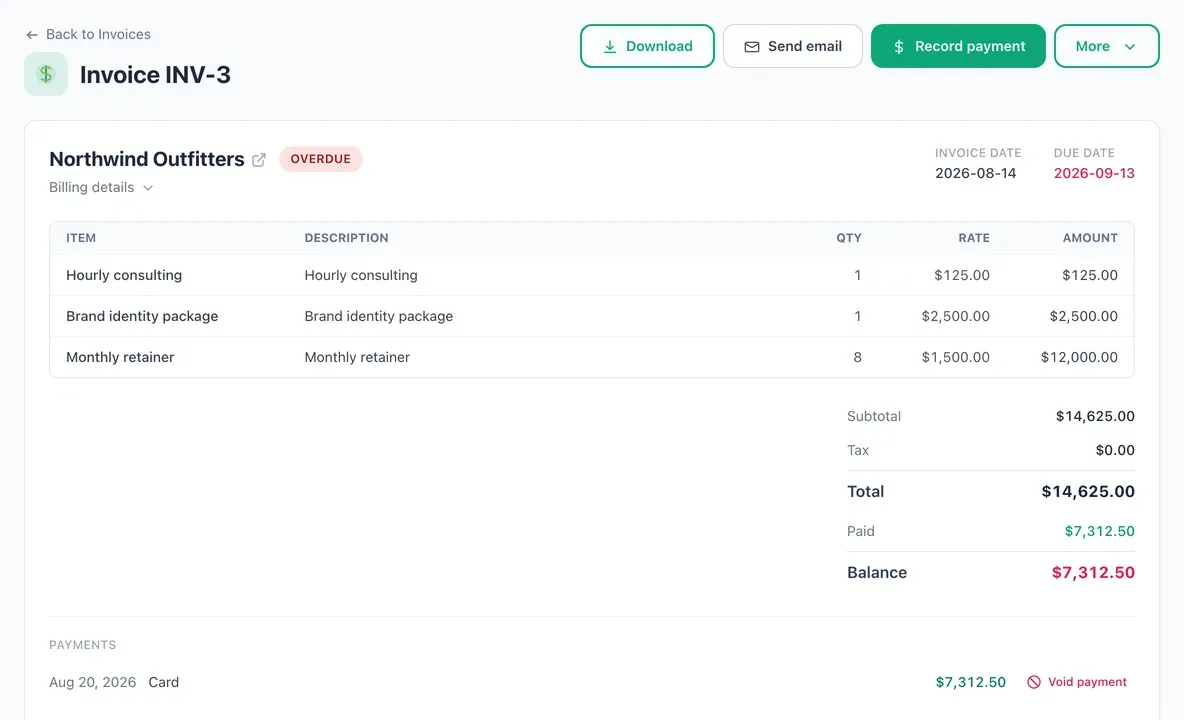
An invoice in Sumqo with three line items, the total, a card payment already received and the balance still due.

Online payments

Card and ACH payments in one place

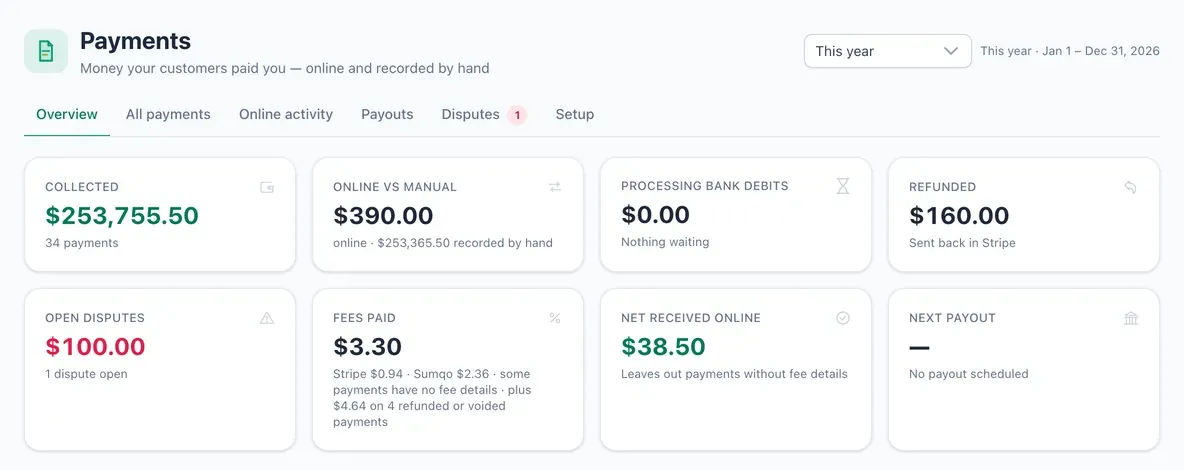
Connect Stripe and clients pay your invoices by card or bank debit. Payments, refunds, disputes and payouts come together on one Payments page, next to the checks and transfers you record by hand.

  • Stripe and Sumqo fees and the net amount of each online payment
  • Disputes listed with the date to respond by
  • A lower Sumqo fee on higher plans
The Payments overview: amount collected this year, online versus recorded by hand, bank debits in progress, refunds, open disputes, fees paid and net received.

Expenses & receipts

Snap a receipt, get every line item

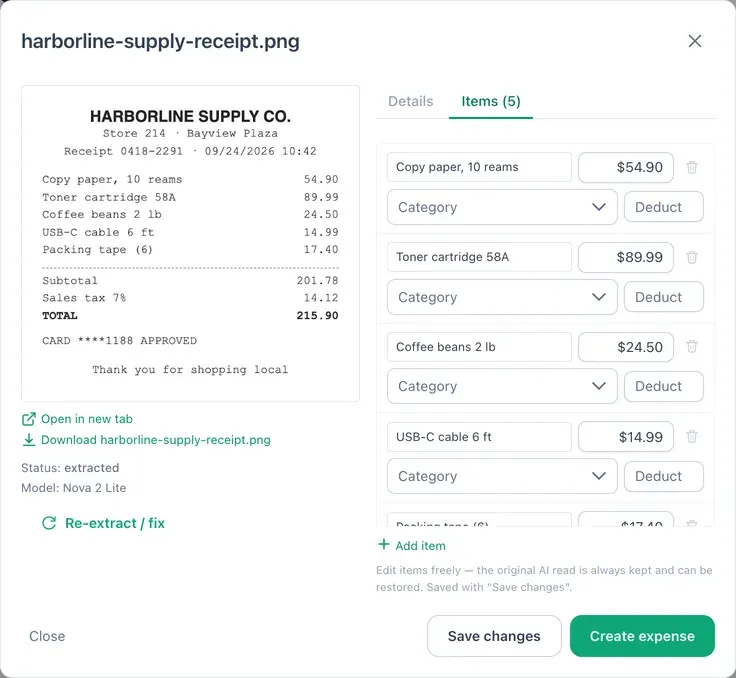
Upload receipts, forward them by email or take a photo on your phone. Sumqo reads the vendor, date, total and each line item, and turns them into an expense you check before it is saved.

  • Line items that can go to different categories
  • Rules for vendors you pay again and again
  • Receipts matched to the expenses they belong to
A store receipt next to the five line items Sumqo read from it, each with its amount and a category to choose.

Banking & reconciliation

Your bank statement drives the books

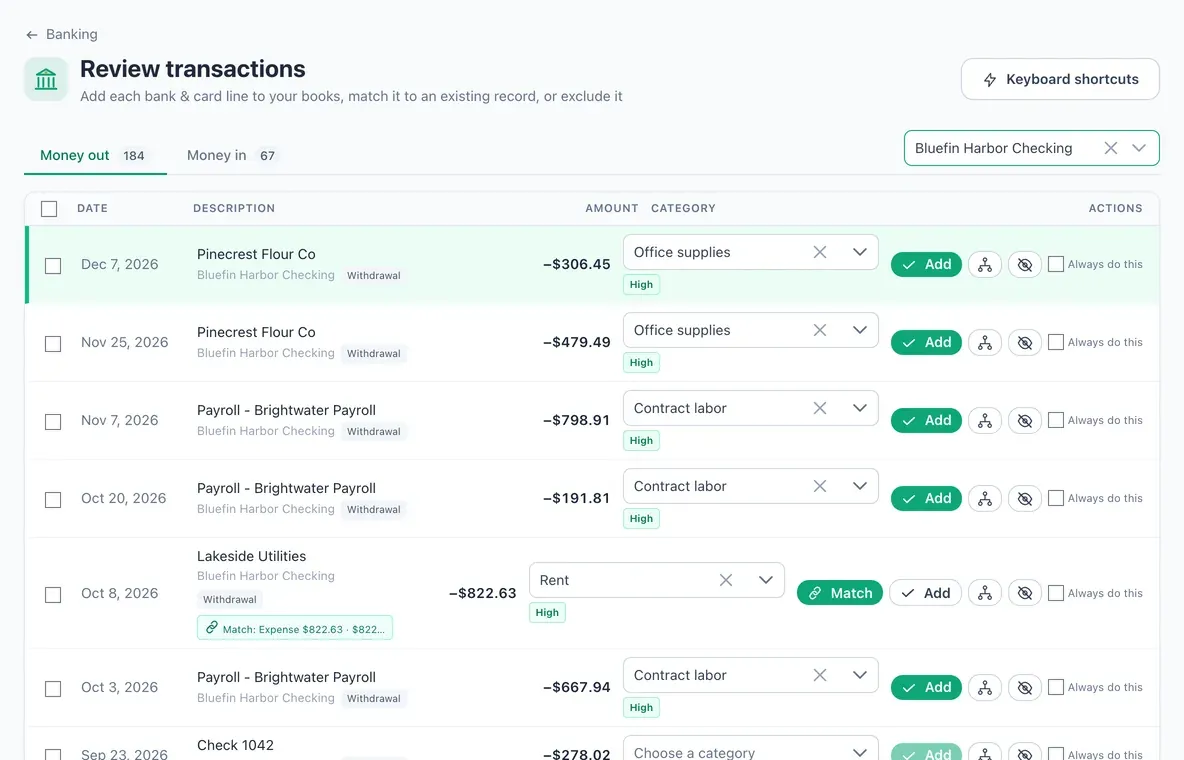
Import bank and card statements as PDF, CSV, OFX, QFX or QBO files. Each line arrives with a suggested category or a match to an invoice, bill or expense you already entered — confirm it with one click.

  • Split one bank line across several records
  • See what is missing before you close a month
  • Reconcile each account to its statement and close at zero
Review transactions: bank lines for one checking account, each with a suggested category, a confidence label and buttons to add, match or exclude it.

Bills, payroll & checks

Pay vendors, contractors and employees

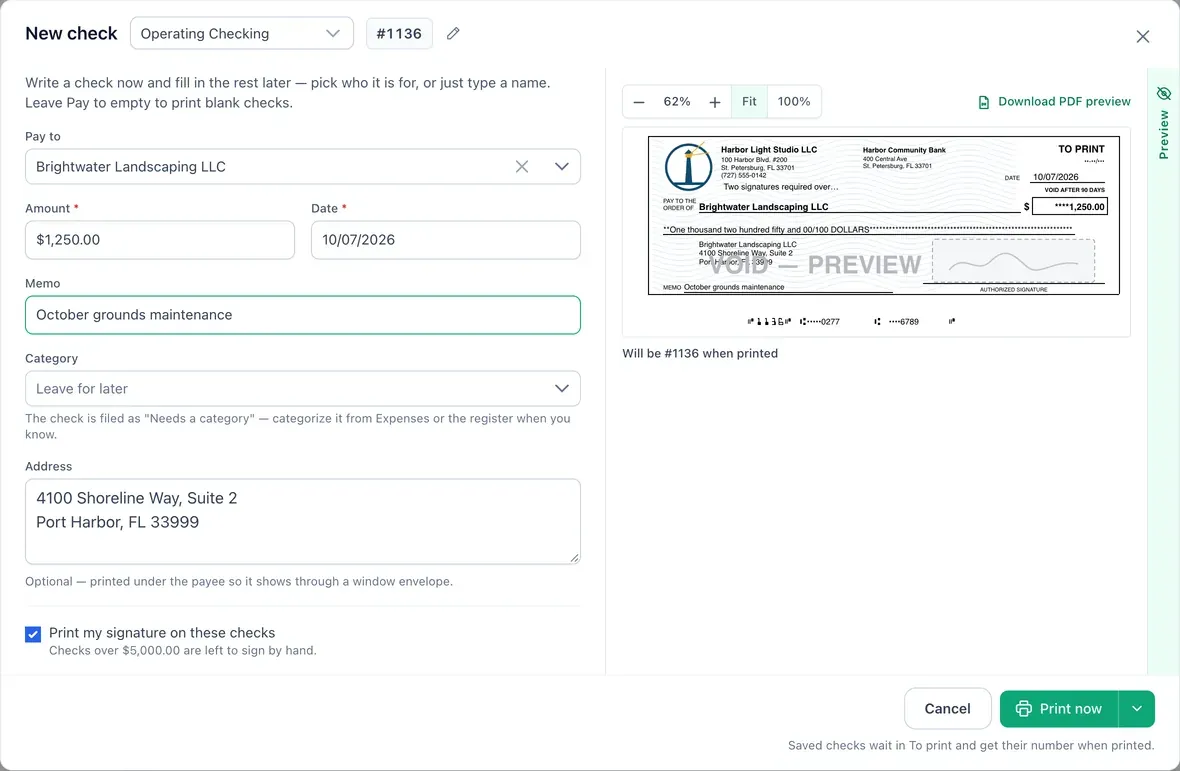
Track bills by due date, collect W-9s with a link and have 1099s ready at year end. Run W-2 payroll with withholding calculations and pay stubs, then print the checks yourself.

  • Checks on blank check paper (with the MICR line) or pre-printed stock
  • Check register and Positive Pay files for your bank
  • Payroll you file and pay yourself — no money moves through Sumqo
Writing a check in Sumqo: payee, amount, memo and mailing address on the left and a live preview of the printed check on the right.

Contracts & e-signature

Get contracts signed online

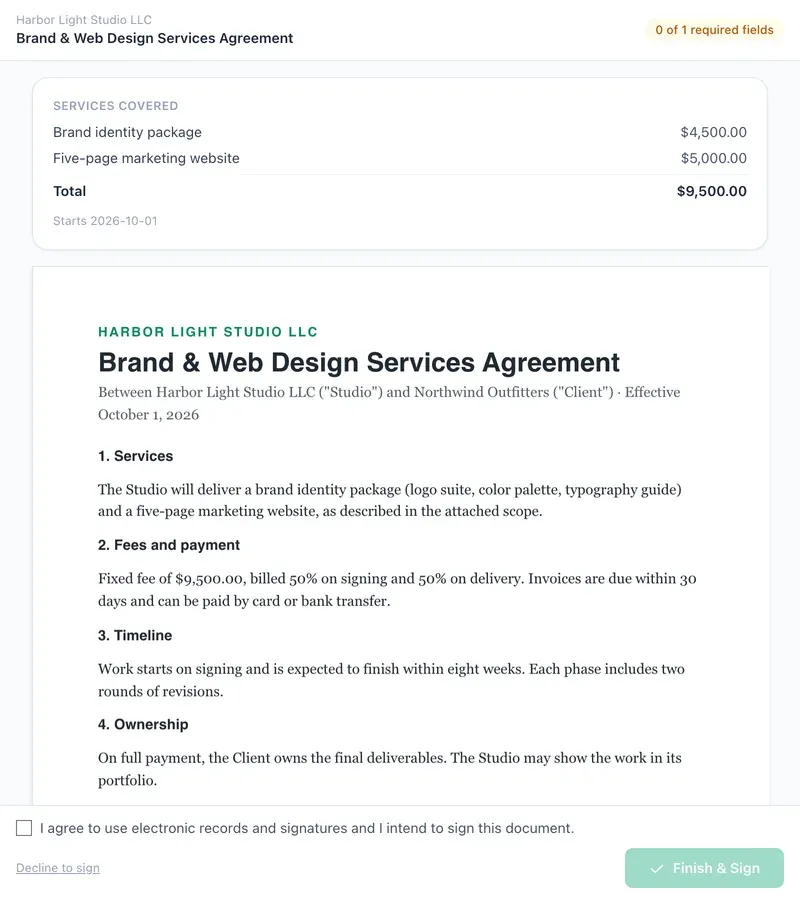
Upload a PDF, place signature and date fields, and send it by email or as a link. The signed copy comes back sealed, with a certificate of completion and a full audit trail.

  • Signing order when several people sign
  • Signer check by emailed code, access code or ZIP
  • Reusable templates and automatic reminders
The signing page a client sees: the services covered with their prices, the agreement text and the consent box before Finish and sign.

AI assistant & briefings

Ask your books — approve what it prepares

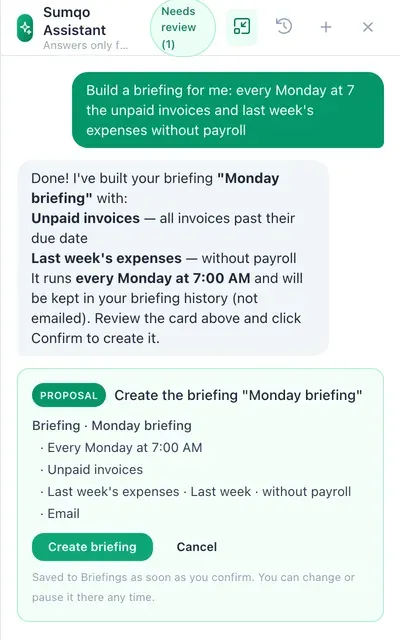
Ask about your numbers in plain words, or have the assistant prepare invoices, expenses or a briefing. Nothing is saved until you review the proposal and confirm it.

  • Briefings: scheduled summaries by email, link or PDF
  • Each proposal shows exactly what will be created
  • Connect Claude or ChatGPT to your books if you prefer
The Sumqo assistant panel proposing a Monday briefing with unpaid invoices and last week’s expenses, waiting for the Create briefing confirmation.

Reports & taxes

Reports and tax prep that keep up

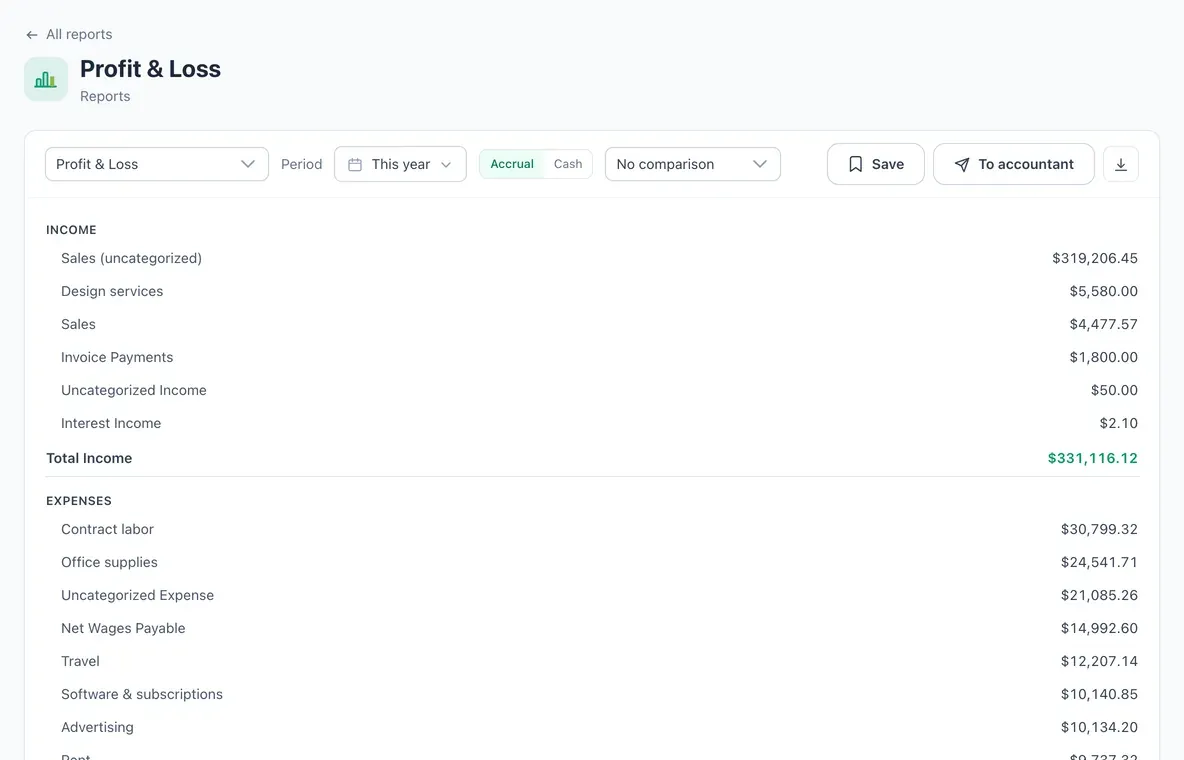
Profit and loss, balance sheet, A/R and A/P aging, sales tax and a cash-flow forecast — on a cash or accrual basis. Export to CSV, Excel or PDF, or send them to your accountant.

  • 1099 season: TIN matching and an IRS IRIS e-file CSV
  • Estimated taxes and a guided year-end tax review
  • Saved reports sent on a schedule
A profit and loss report for this year, with income and expense categories and their totals.

And everything around it

The details that make it a place to run the books, not just send invoices.

  • Several companies

    Run more than one business — or your personal books — from one login.

  • Roles & permission groups

    Invite your team or accountant with exactly the access they need.

  • QuickBooks import

    Bring the full QuickBooks Online export over. Re-running never duplicates.

  • Import & export

    CSV and Excel in; CSV, Excel and PDF out; a full backup anytime.

  • Customer portal

    Clients see their invoices, payments and statements in one place.

  • Recurring & reminders

    Weekly, monthly or custom schedules, with reminders you control.

  • Email templates & tracking

    Edit every email and see when it was delivered and opened.

  • Time & projects

    Timesheets, team hours and projects you can bill from.

  • API & webhooks

    Scoped API keys, signed webhooks and an MCP server.

    Developer docs
  • On your phone

    Install Sumqo from the browser and snap receipts on the go.

  • Audit trail

    See who changed what, and restore recently deleted records.

  • Free invoice generator

    Make a PDF invoice in your browser — no account needed.

    Open it

Up and running in minutes

  1. Create your books

    Sign up and pick your currency and time zone — business or personal, you choose.

  2. Bring in your data

    Import your history from QuickBooks, or upload bank statements and receipts.

  3. Review and confirm

    Sumqo suggests categories and matches; you confirm them and your reports stay current.

AI suggestions are a starting point you review and confirm. Sumqo helps you organize your books — it isn't tax, accounting or legal advice.

Simple plans that grow with you

Unlimited invoices on every plan. Pay online and the more you grow, the lower your payment fee.

Offline

Just need invoices? No account, nothing stored.

$0no login
No online payments — download or share the PDF.
Open the free app
  • No account, no sign-up
  • Invoices, income & expenses on your device
  • Download branded PDFs
  • Export / import your data
  • Pay online & email need an account

Free

No credit card, ever. The real hook — generous on purpose.

$0forever
Sumqo fee per online payment: 1% + 30¢on top of Stripe's processing — not included
Start free — no card
  • No credit card required
  • Unlimited invoices & expenses
  • Multiple users included
  • AI receipt scanning (monthly limit)
  • Core P&L & reports
  • QuickBooks import
Most popular

Pro

For growing businesses and freelancers.

$19/mo

Card subscriptions are charged this list price.

Sumqo fee per online payment: 0.4% + 20¢on top of Stripe's processing — not included
Choose Pro
  • Everything in Free
  • Roles & granular permissions
  • Recurring invoices & reminders
  • Full AI receipt line-item breakdown
  • Smart bank reconciliation
  • Lower Sumqo fee on payments

Scale

For teams that live in their books.

$49/mo

Card subscriptions are charged this list price.

Sumqo fee per online payment: 10¢ flaton top of Stripe's processing — not included
Choose Scale
  • Everything in Pro
  • Unlimited users
  • Multi-entity / multiple sets of books
  • Advanced reconciliation & reporting
  • Priority support
  • Lowest Sumqo fee on payments

When a client pays an invoice online, Stripe charges its own processing fee — its standard US card rate is about 2.9% + 30¢ per payment. The Sumqo fee shown on each plan is separate and added on top. Payments you record by hand have no fee. Prices are in US dollars and paid plans renew monthly — see the Subscription Terms.

Built to protect your financial data

Each workspace's data is kept separate, every person signs in with their own account and can turn on two-factor sign-in, and new devices are verified. Your data is yours — export it anytime.

  • Two-factor sign-in

    Authenticator app or emailed codes, per person

  • Trusted devices

    New devices are verified; known ones are remembered

  • Workspace isolation

    Every record is scoped to your workspace and its permissions

  • Your data, exportable

    CSV, Excel, PDF and full backups anytime

Questions, answered

Is Sumqo free?

Yes. The Free plan costs nothing, needs no credit card and includes unlimited invoices and expenses. Paid plans add a larger AI allowance and a lower fee on online payments. For a one-off invoice you can also use the free invoice generator without creating an account.

Can I bring my data over from QuickBooks?

Yes. Upload the Export Data ZIP from QuickBooks Online, or individual CSV and Excel lists, in Settings → Import / Export. Customers, vendors, invoices with their line items and expenses come over, and running the import again updates records instead of duplicating them.

Do my clients need an account to pay me?

No. Every invoice has its own secure page: your client opens the link, sees the invoice and pays by card or bank debit (ACH) through Stripe — no sign-up. You can also invite clients to a portal that lists all their invoices and payments.

What does it cost to accept card and ACH payments?

Stripe charges its own processing fee on each online payment (its standard US card rate is about 2.9% + 30¢; check Stripe's pricing for bank debits). Sumqo adds a small fee per online payment that depends on your plan, shown on each plan above. Payments you record by hand — cash, check or bank transfer — have no fee.

Is Sumqo accounting or tax advice?

No. Sumqo is software that helps you keep organized books and produce tax-ready reports. AI suggestions are a starting point that you review and confirm. For tax, legal or accounting decisions, talk to a qualified professional.

Can I export my data?

Anytime. Lists and reports export to CSV, Excel or PDF, and workspace owners can download a full backup. Your data stays yours.

Can I use Sumqo for my personal finances?

Yes. Pick personal books when you sign up to track income and spending, keep receipts and bank statements together and stay ready for your tax filing. Business and personal books can live in separate workspaces under one login.

What does "beta" mean?

Sumqo is in early access: it is live and you can run your books on it today, but features may still change and occasional issues are possible. Suggestions you send from the help menu can be approved and built — contributors are credited on the Contributors page.

Ready to get your books in order?

Create your company — or your personal books — in a couple of minutes.